Protecting yourself from ransomware
Ransomware is the one threat where the outcome is binary: either you have a copy of your files that the malware could not reach, or you do not.
Why this one is different
Most malware steals something you can, with effort, replace or revoke. A stolen password can be changed. A hijacked session can be ended. Ransomware is different because it destroys access to the data itself, and it does so deliberately and irreversibly. Modern families use standard cryptography competently; there is usually no flaw to exploit and no tool that undoes the damage.
That single fact reorders all the advice. Prevention matters, but preparation matters more, because preparation is what still works when prevention has failed.
How an attack unfolds
An incident runs through recognisable stages. Software can intervene at the first four. After the fourth, it cannot.
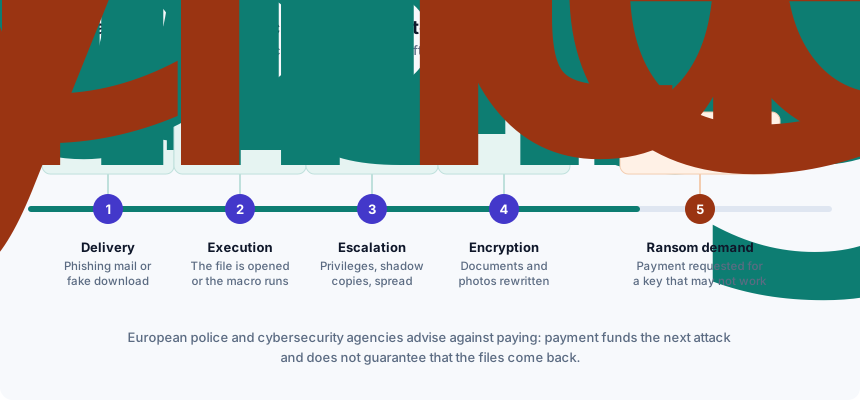
- Delivery. A phishing email, a malicious attachment, a fake software installer, or an exploited vulnerability in something exposed to the internet. Mail and web filtering work here.
- Execution. Someone opens the file or enables the macro. Real-time file scanning works here.
- Escalation. The malware acquires higher privileges, disables recovery options, deletes volume shadow copies and looks for network drives and connected backups. Behavioural monitoring works here — and this is the stage where a well-tuned engine earns its price, because the actions are unmistakably abnormal.
- Encryption. Documents, photographs and archives are rewritten. Some products can detect the mass-rewrite pattern and halt it part-way, saving some files. Partial, not reliable.
- The demand. A note appears. At this point the software question is over and the backup question begins.
The defence that still works afterwards
A backup is the only measure that helps after stage four, and most people's backups would not survive a real attack. The reason is that ransomware deliberately looks for them.
A synced cloud folder is not a backup. When ransomware encrypts the local copy, the sync client faithfully uploads the encrypted version. Some services keep file version history that can be rolled back, which may save you — but that is a recovery feature you should test before you need it, not a property you should assume.
What does work:
- An offline copy. An external drive that is connected only while the backup runs and is physically unplugged the rest of the time. Malware cannot encrypt a disk that is not attached.
- More than one copy, in more than one place. The conventional formulation is three copies of the data on two different kinds of media with one kept off-site. For a household, that can be as simple as: the computer, an external drive in a drawer, and a cloud service with version history.
- A restore you have actually tested. An untested backup is a hypothesis. Restore a handful of files from it once, and confirm they open.
- Versioning, where available. The ability to retrieve yesterday's copy of a file is what turns a sync service into something useful in this scenario.
Reducing the chance of reaching stage four
- Keep the operating system and browser updated. Automatic updates, enabled. A substantial share of intrusions use vulnerabilities for which a patch already existed.
- Run one real-time scanner — one, not two. On Windows, Microsoft Defender is on by default and steps aside automatically if you install a third-party suite.
- Be hostile to unexpected attachments, particularly documents that ask you to enable macros or editing, and archives containing a single executable.
- Do not install cracked software. It is one of the most reliable delivery routes there is, and the person offering you a free copy of an expensive program is not doing you a favour.
- Use a standard user account for daily work, not an administrator account, so that privilege escalation at stage three is at least an obstacle.
- Turn on multi-factor authentication for email and cloud storage, so that a stolen password does not hand over the backups too.
The first hour, in order
If you believe a device is infected, the order of these steps matters more than the speed.
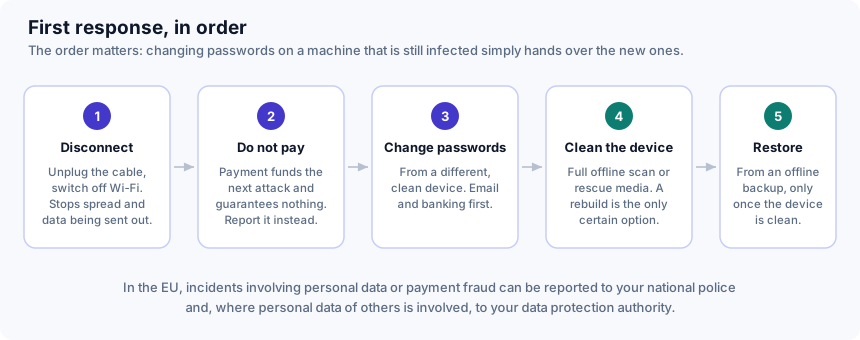
- Disconnect. Unplug the network cable, switch off Wi-Fi. This limits spread to other machines and stops data being sent out. Do not connect backup drives to the affected machine.
- Do not pay. European law-enforcement and national cybersecurity agencies consistently advise against it. Payment funds the next attack, marks you as someone who pays, and buys only a promise; decryptors supplied by criminals are frequently incomplete or simply do not work.
- Change your passwords from a different, clean device — email first, because email is how every other account is reset, then banking and anything financial.
- Clean or rebuild the machine. A full scan from rescue media is the minimum. A wipe and reinstall is the only approach that is actually certain, and for a personal machine it is usually the faster route to confidence.
- Restore from your offline backup, and only once the device is clean — restoring onto a still-infected machine simply re-encrypts the restored files.
- Report it. In the EU, report to your national police; where the personal data of other people is involved, your national data protection authority may also need to be informed. Check whether a free decryptor exists for the family that hit you before you give up on the files — several public initiatives collect them.
If you remember four things
- An offline copy of your irreplaceable files is worth more than any subscription.
- A synced folder is not a backup unless it has version history you have tested.
- Disconnect first; change passwords from a different device, not the infected one.
- Do not pay. It funds the next attack and guarantees nothing.
Related
- How antivirus software works — what behavioural monitoring is doing at stage three.
- Spotting phishing and scam emails — stage one, where most incidents begin.
This guide is general consumer information, not professional security advice. It is written by Sandra Ward for DALAMIS s.r.o. and is funded, like the rest of this site, by affiliate commission earned elsewhere on it — see our editorial policy. Product names mentioned are the trademarks of their owners; where a vendor's own published information differs from this page, the vendor's information prevails.