How antivirus software works
The name is forty years out of date. Here is what the software on your machine is actually doing, and what it can and cannot promise.
The problem signatures could not solve
The original design was simple. Researchers collected samples of malicious programs, extracted a distinctive fingerprint from each — a signature — and shipped the list to customers. The scanner compared files on your disk against the list. If something matched, it was malware.
This worked while malware was written by individuals and spread slowly. It stopped working when attackers automated the generation of variants. If a criminal toolkit can produce a structurally different version of the same program for every victim, no list of fingerprints can keep up: by the time a sample is collected, analysed and catalogued, it has already been replaced.
Signatures did not disappear, because for anything already known they remain the fastest and most certain method available. They simply stopped being sufficient on their own.
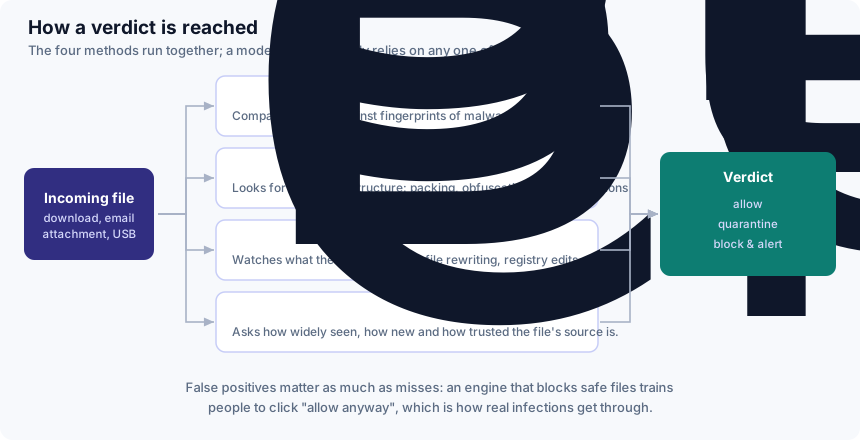
The four methods, in plain terms
Signature matching
A comparison against fingerprints of known malware. Fast, cheap, and definitive when it hits. Useless against anything genuinely new.
Static heuristics
An examination of the file itself, without running it. The engine looks at structure rather than identity: is the code packed or deliberately obfuscated? Does an apparent document contain an executable? Does a small utility request permissions that only a system tool would need? None of these proves malice — plenty of legitimate software is packed — so heuristics produce suspicion, not certainty.
Behavioural monitoring
The most important development of the last decade. Instead of asking what a file is, the engine watches what it does once running. A process that begins opening thousands of documents in sequence, rewriting each one and deleting the original, is behaving like ransomware regardless of what it is called or how it is packaged. Behavioural rules catch families that have never been seen before, which is precisely what signatures cannot do.
Cloud reputation
Your scanner asks the vendor's network what it knows about this file: how many machines have seen it, for how long, and how it has behaved elsewhere. A binary installed by twenty million people over three years is probably fine. A binary that exists on four machines worldwide and was compiled two hours ago deserves much more suspicion. This is also why security software makes network requests, and why an offline machine is protected slightly less well than a connected one.
The trade-off nobody advertises
Each of these methods can be tuned to be more aggressive. Doing so raises the detection rate — and raises the false positive rate with it, meaning safe files blocked by mistake.
This is not a cosmetic problem. A product that regularly quarantines your accounting software, your development tools or a file a colleague sent you trains you to click "allow anyway" without reading the warning. That habit is worth more to an attacker than any technical weakness in the engine. It is why the independent laboratories test false positives as a separate scored category, and why you should read that column as carefully as the protection column.
What to take from this
- Detection is four overlapping methods, not one lookup table.
- Behavioural monitoring is what catches genuinely new threats.
- A high detection rate with a high false-positive rate is a worse product, not a better one.
- No combination of the four is a guarantee. Layers reduce risk; they do not eliminate it.
What antivirus software cannot do
- It cannot stop you typing your password into a convincing fake. Web filtering blocks known phishing sites, but a page registered an hour ago may not be known yet. See our phishing guide.
- It cannot recover encrypted files. Once ransomware has finished, only a backup helps. See our ransomware guide.
- It cannot patch your software. An out-of-date browser or operating system is an open door that no scanner closes.
- It cannot protect an account whose password you have reused. If a password you use elsewhere appears in a breach, the attacker does not need to touch your computer at all.
How to read laboratory results
Three organisations publish methodologies and regular results: AV-TEST in Germany, AV-Comparatives in Austria and SE Labs in the United Kingdom. Read them directly rather than through a vendor's summary.
Three habits will keep you out of trouble. Check the date of the round — results move, and a two-year-old chart proves nothing about today. Check the false-positive score alongside the protection score. And notice how many products share the top award: in most recent rounds, a handful of well-known products all achieve the maximum, which means "top-rated" is a much weaker distinction than it sounds, and "the best antivirus" is usually a claim no published test supports.
Do you need to pay for it?
An honest answer, from a site funded by affiliate commission: not necessarily. Microsoft Defender is included with Windows, costs nothing, and is tested by the same laboratories as the paid products — in AV-Comparatives' February–May 2026 Real-World Protection round it was among those awarded the top ADVANCED+ rating, alongside Norton and several others.
What a paid suite adds is mostly consolidation and support rather than raw detection: one interface, a firewall you can configure, a password manager, cloud backup, a company to call, and in the higher tiers a VPN and monitoring services. Whether that is worth its renewal price is a question about your circumstances. Our guide to choosing sets out the six questions that decide it.
This guide is general consumer information, not professional security advice. It is written by Sandra Ward for DALAMIS s.r.o. and is funded, like the rest of this site, by affiliate commission earned elsewhere on it — see our editorial policy. Product names mentioned are the trademarks of their owners; where a vendor's own published information differs from this page, the vendor's information prevails.